
Navigation is one of those things in Flutter that looks simple… until it isn’t.
At first, pushing a screen feels straightforward. But as your app grows — multiple flows, authentication states, nested routes — things start getting messy. Back stacks behave unexpectedly, screens duplicate, and users land in places they shouldn’t.
We’ve been there.
So in this guide, we’re breaking down Flutter navigation in a way that actually makes sense — with real use cases, clean patterns, and common mistakes developers often overlook.
The Core Idea of Navigation in Flutter
Flutter uses a stack-based navigation system.
Think of it like this:
- Every new screen is pushed onto a stack
- Going back pops the top screen
- You can replace, reset, or manipulate the stack as needed
Basic Navigation (Push & Pop)
Go to a new screen
Navigator.push(
context,
MaterialPageRoute(builder: (context) => SecondScreen()),
);
Go back
Navigator.pop(context);
Replace Current Screen
Useful for flows like login → home (you don’t want users going back to login).
Navigator.pushReplacement(
context,
MaterialPageRoute(builder: (context) => HomeScreen()),
);
Clear Entire Navigation Stack
Used after authentication, onboarding, etc.
Navigator.pushAndRemoveUntil(
context,
MaterialPageRoute(builder: (context) => HomeScreen()),
(route) => false,
);
Pop Until Specific Screen
Navigator.popUntil(context, (route) => route.isFirst);
Named Navigation (Clean & Scalable)
Instead of repeating routes everywhere, define them once:
routes: {
  '/home': (context) => HomeScreen(),
  '/profile': (context) => ProfileScreen(),
}
Navigate
Navigator.pushNamed(context, '/profile');
Replace
Navigator.pushReplacementNamed(context, '/home');
Clear Stack
Navigator.pushNamedAndRemoveUntil(
  context,
  '/home',
  (route) => false,
);
Safe Navigation (Avoid Crashes)
Check if you can go back
if (Navigator.canPop(context)) {
  Navigator.pop(context);
}
Safer alternative
Navigator.maybePop(context);
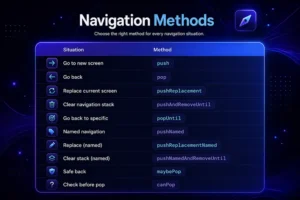
Navigation Cheat Sheet (Practical Use Cases)
Here’s a quick reference we actually use in real projects:
Common Mistakes We’ve Seen
This is where most developers struggle 👇
1. Using push instead of pushReplacement
Problem : Users can go back to login/signup screens
Fix : Use pushReplacement after authentication
2. Not clearing stack after login
Problem : Back button leads to unwanted screens
Fix : Use pushAndRemoveUntil
3. Overusing anonymous routes
Problem : Hard to maintain and debug
Fix : Switch to named routes for scalability
4. Ignoring back stack behavior
Problem : Unexpected navigation flows
Fix : Always think: what should happen when user presses back?
5. Calling pop without checking
Problem : App crashes if no route exists
Fix : Use canPop or maybePop
6. Mixing navigation styles randomly
Problem : Inconsistent architecture
Fix : Stick to one approach (prefer named routes in bigger apps)
7. Not handling deep navigation flows
Problem : Complex flows break easily
Fix : Plan navigation structure early (especially for multi-step flows)
Practical Insights from Production Experience
- Keep navigation logic centralized (avoid scattering it everywhere)
- Use named routes for medium to large apps
- Think in terms of user journey, not just screens
- Test navigation like a user — not just as a developer
Final Thoughts
Flutter navigation isn’t complicated — but it becomes confusing when we don’t structure it properly.
Once you understand:
- Stack behavior
- When to replace vs push
- How to reset flows
everything starts to click.
The key is not just knowing the methods — it’s knowing when to use them.